Note
Go to the end to download the full example code.
Modify initial conditions of the cavity case
By the end of this tutorial you will have:
read the cavity’s velocity field from
0/U,replaced its internal field with an analytic Taylor–Green–style vortex through a zero-copy NumPy view,
written the modified field back to disk, and
visualized the result with pyvista.
The skill on display is the round-trip: a NumPy edit lands inside
the same buffer that OpenFOAM owns, and once pybFoam.write()
serialises it, every downstream OpenFOAM tool — including pyvista’s
OpenFOAMReader — sees the new state.
Prerequisites
Finished Read, modify, and write OpenFOAM dictionaries and Build and operate on a scalarField.
pybFoam installed with the
[docs]extra (pyvistais required for the plot at the end).
Clone the case
case = /tmp/pybfoam_zj9n8lj6/cavity
Build the mesh
The cavity ships only system/blockMeshDict; we generate the
polyMesh explicitly so the meshing step is visible in the script.
(T3 lets the solver class take care of this internally.)
from pybFoam import Time, argList, dictionary, fvMesh
from pybFoam.meshing import generate_blockmesh

time = Time(argList([str(case), "-case", str(case)]))
generate_blockmesh(time, dictionary.read(str(case / "system" / "blockMeshDict")))
mesh = fvMesh(time)

print(f"nCells = {mesh.nCells()}   nPoints = {mesh.nPoints()}")
nCells = 10000 nPoints = 20402
Read U
volVectorField.read_field opens <case>/0/U and returns a
field whose internalField is exposed as a zero-copy buffer.
import numpy as np

from pybFoam import volVectorField

U = volVectorField.read_field(mesh, "U")
U_view = np.asarray(U["internalField"])

print(f"U.shape  = {U_view.shape}")
print(f"U[0]     = {U_view[0]}")
print(f"|U| max  = {np.linalg.norm(U_view, axis=1).max():.4f}  (uniform IC)")
U.shape  = (10000, 3)
U[0]     = [0. 0. 0.]
|U| max  = 0.0000  (uniform IC)
Build a Taylor–Green-style initial condition
fvMesh.C returns the cell-centre volVectorField. We
pull it through NumPy and use the cell coordinates to evaluate an
analytic divergence-free vortex on the (x, y) plane:
The cavity’s domain is \(L = 0.1\,\text{m}\).
L = 0.1  # cavity side length, from system/blockMeshDict (scale 0.1)

C = np.asarray(mesh.C()["internalField"])
x, y = C[:, 0], C[:, 1]

U_view[:, 0] = np.sin(np.pi * x / L) * np.cos(np.pi * y / L)
U_view[:, 1] = -np.cos(np.pi * x / L) * np.sin(np.pi * y / L)
U_view[:, 2] = 0.0

print(f"|U| max  = {np.linalg.norm(U_view, axis=1).max():.4f}  (after edit)")
print(f"|U| mean = {np.linalg.norm(U_view, axis=1).mean():.4f}")
|U| max  = 0.9998  (after edit)
|U| mean = 0.6775
Write U back to disk
The NumPy edit modified OpenFOAM’s owned memory in place; calling
pybFoam.write() serialises the field — boundary conditions
included — back into <case>/0/U.
from pybFoam import write

U.correctBoundaryConditions()
write(U)

written_U = (case / "0" / "U").read_text().splitlines()
nonuniform_lines = [i for i, line in enumerate(written_U) if "nonuniform" in line]
print(f"file lines        : {len(written_U)}")
print(f"'nonuniform' at line(s): {nonuniform_lines}")
# A successful round-trip turns the 'uniform (0 0 0)' entry into a
# 'nonuniform List<vector>' block. If you still see 'uniform' here,
# the write did not pick up the modified internalField.
file lines        : 10045
'nonuniform' at line(s): [20]
Visualize the modified IC
pybFoam.pyvista_read() wraps pyvista’s POpenFOAMReader so it
reads the case directory we just wrote. We slice to the front face
(z ≈ 0.005) to get a 2-D view and colour by |U|.
import pyvista as pv

from pybFoam import pyvista_read

reader = pyvista_read(case, time=0.0)
internal = reader.read()["internalMesh"]
internal.set_active_vectors("U")

slice_mid = internal.slice(normal="z", origin=(0.05, 0.05, 0.005))

plotter = pv.Plotter(window_size=(640, 540), off_screen=True)
plotter.add_mesh(
    slice_mid,
    scalars="U",
    cmap="viridis",
    show_edges=False,
    scalar_bar_args={"title": "|U|  [m/s]"},
)
plotter.add_mesh(
    slice_mid.glyph(orient="U", scale="U", factor=0.03, tolerance=0.04),
    color="white",
    line_width=1,
)
plotter.view_xy()
plotter.show()
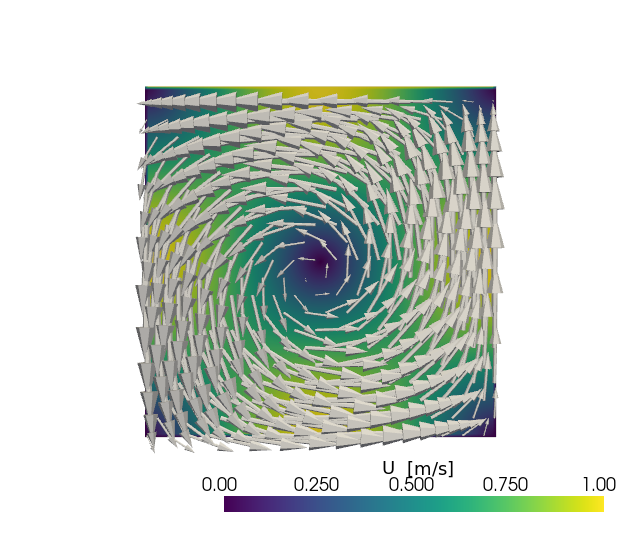
A successful edit shows a single rotating cell with stagnation at
(L/2, L/2) and peak speed near the corners. A flat or noisy
image would mean the NumPy edit never reached disk.
Total running time of the script: (0 minutes 7.414 seconds)