Note
Go to the end to download the full example code.
Run blockMesh and checkMesh from Python
Build a mesh from system/blockMeshDict with
pybFoam.meshing.generate_blockmesh() and inspect it with
pybFoam.meshing.checkMesh(). Both are direct bindings of the
OpenFOAM utilities — the returned fvMesh is a regular mesh that can
be used immediately for field access, sampling, or further checks.
Prerequisite: OpenFOAM v2312+ sourced; pybFoam installed.
Prepare a working case
pybFoam.clone_example() copies the named example into a tmp
directory so the baseline under examples/ stays pristine.
working case: /tmp/pybfoam_xebrmcg5/case
Generate the mesh
nCells  = 2268
nFaces  = 9176
nPoints = 4746
Inspect mesh quality
checkMesh returns a structured dict with mesh_stats,
cell_types, topology, geometry, quality, passed,
failed, and total_errors. Select the flags you want — here we
run the topology + geometry checks.
result = checkMesh(
    mesh,
    check_topology=True,
    all_topology=True,
    all_geometry=True,
    check_quality=False,
)

print(f"passed       = {result['passed']}")
print(f"total_errors = {result['total_errors']}")
print(f"hex cells    = {result['cell_types'].get('hexahedra', 0)}")
print(f"max non-orth = {result['geometry']['max_non_orthogonality']:.3f}")
passed       = True
total_errors = 0
hex cells    = 2268
max non-orth = 0.000
Patch breakdown
Iterate mesh.boundary() (the fvBoundaryMesh) to see what
patches the mesh actually has — useful when verifying that the
boundary section of blockMeshDict came through as expected.
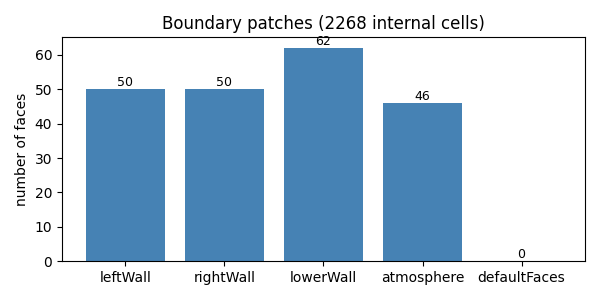
leftWall         faces=50
rightWall        faces=50
lowerWall        faces=62
atmosphere       faces=46
defaultFaces     faces=0
Plot the patch face counts
A simple matplotlib bar chart confirms the mesh has the patches the user expects. A missing or zero-face patch shows up immediately.
import matplotlib.pyplot as plt

names = [p[0] for p in patches]
sizes = [p[1] for p in patches]

fig, ax = plt.subplots(figsize=(6, 3))
ax.bar(names, sizes, color="steelblue")
ax.set_ylabel("number of faces")
ax.set_title(f"Boundary patches ({mesh.nCells()} internal cells)")
for i, n in enumerate(sizes):
    ax.text(i, n, f"{n}", ha="center", va="bottom", fontsize=9)
fig.tight_layout()
plt.show()
See also
Extract typed field entries from a dictionary — extract typed field entries from any dictionary, including
blockMeshDict.
Total running time of the script: (0 minutes 0.149 seconds)